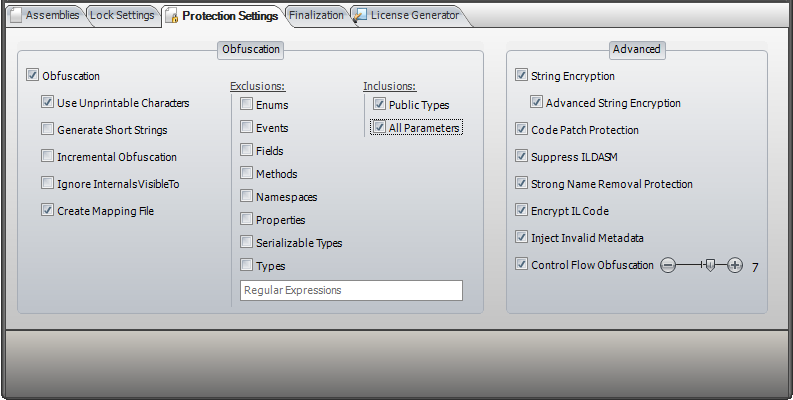
The Protection Settings page allows you to enable a various of protection options.
Obfuscation - IntelliLock provides thorough class, type, and variable obfuscation. Obfuscation is the process of making your source code more difficult (but not impossible) for humans to understand. Obfuscation works by replacing the meaningful names you assign to classes, methods, properties and variables with meaningless ones. For example, it may replace a variable name of "counter" with "A4DF3CV89G" - to humans these obfuscated names are confusing and difficult to remember, but have no effect on the .NET Framework interpreter.
Use Unprintable Characters - Uses unprintable strings to obfuscate type and member names, but cannot be used if your assembly must run as safe code.
Generate Short Strings - Enable this option to generate short strings for your obfuscated class and member names. This can reduce the file size.
Incremental Obfuscation - If you want IntelliLock always to generate the same obfuscation strings for type and member names, you need to enable this option.
Create Mapping File - Creates a file which cross reference unobfuscated names with obfuscated ones, which is used by the Stack Trace Deobfuscator.
Ignore InternalVisibleTo - Enable this option to obfuscate internal classes and members, even if the InternalsVisibleTo assembly attribute is used.
Exclusions - If you want to prevent specific kind of types or members from obfuscation, you can enable the corresponding option here. Please note, IntelliLock offer declarative obfuscation as well.
Inclusions - If you want to obfuscate all types or members (including public one), you need to enable to corresponding option here.
String Encryption - Disguises internalized text. This encryption makes it much more difficult for a hacker to attempt a code patch of your assembly, as he will be unable to identify the text of messages or other useful strings, making it much more difficult to identify where to patch your code.
Advanced String Encryption - In addition to the standard String Encryption above this option adds special anti tampering code. Any try to recompile your code by any hacker tool will fail.
Code Patch Protection - Enable this option to prevent your source code from being tampered by hacker tools.
Suppress ILDASM - Enable this option to suppress disassembly to IL using the ILDASM.exe tool.
Strong Name Removal Protection - This option prevents your protected assembly from being tampered by hacker tools.
Encrypt IL Code - Enable this option to encrypt the source code of your methods. At runtime the source code will be decrypted in memory.
Inject Invalid Metadata - Injects invalid metadata. Most tools are unable to read assemblies with invalid metadata. Of course, your assembly remains fully functional to the .NET runtime.
Control Flow Obfuscation - Mangles program flow, making it extremely difficult for human eyes to follow the program logic. Level 9 represents strongest control flow obfuscation.