

#
Trimming Problems
When you protect .NET projects with .NET Reactor, the injected protection code may reference specific classes and members.
If you publish the project with trimming enabled (to reduce the application size), the trimmer might remove these elements.
This can lead to runtime errors or broken functionality.
#
Solution
To ensure that all required classes and members are kept during trimming, use the Eziriz.Reactor.TrimHelper NuGet package and apply the additional configuration described below.
#
1. Install the NuGet Package
Add the Eziriz.Reactor.TrimHelper NuGet package to your project.
This package helps to ensure that the classes and members used by the protection algorithms are not trimmed.
dotnet add package Eziriz.Reactor.TrimHelperAlternatively, you can install it via the NuGet Package Manager in your IDE.
NuGet Package Link:
Eziriz.Reactor.TrimHelper
#
2. Update the Project File
Add the following configuration to your project file (.csproj, .vbproj, etc.) to explicitly preserve all types and members in the TrimHelper assembly:
<ItemGroup>
  <TrimmerRootAssembly Include="TrimHelper" RootMode="library" />
</ItemGroup>
Read more: Root Assemblies
#
3. Alternatively Use a Link XML File
Instead of using TrimmerRootAssembly, you can use a link.xml file.
Create a file named link.xml with the following content and replace YourAssembly with the name of your own assembly:
<assembly fullname="TrimHelper">
  <type fullname="*" preserve="all" />
</assembly>
<assembly fullname="YourAssembly">
  <type fullname="*" preserve="all" />
</assembly>
Read more: Root Descriptors
Then add the following entry to your project file:
<ItemGroup>
  <TrimmerRootDescriptor Include="link.xml" />
</ItemGroup>
#
4. Further Tweaks and Hints
In your .NET Reactor project file, make sure that
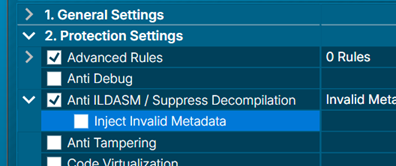
“Protection Settings” → “Anti ILDASM / Suppress Decompilation” is not enabled.
Otherwise,NullReferenceExceptionerrors can occur during trimming.
If you use the Visual Studio / Rider Add-in or the Build Integration Manager and the Protection Timing is set to “After Compile”:
- In this case, protection happens before trimming.
- Some .NET Reactor features are not compatible with trimming when protection is applied before trimming.
Please disable the following features in this scenario:NecroBitAnti TamperingCode VirtualizationHide Method Calls
- If you protect your software after the full application deployment / publish (i.e., after trimming), you can use all protection features without restrictions.
For Android and MAUI applications, you must use the Protection Timing = “After Compile”.
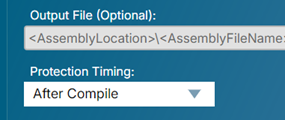
In this case, follow the recommendations above and keepNecroBit,Anti Tampering,Code Virtualization, andHide Method Callsdisabled.
#
Why This Is Necessary
The trimming process removes unused code to reduce application size.
However, .NET Reactor’s protection algorithms rely on certain classes and members being available at runtime.
By:
- using the
Eziriz.Reactor.TrimHelperpackage and - updating your project file (or using
link.xml) as shown above,
you ensure that all required elements are preserved.
This allows you to safely use .NET Reactor with projects that enable trimming, without running into runtime issues.