

#
Root and Virtual Service Endpoints
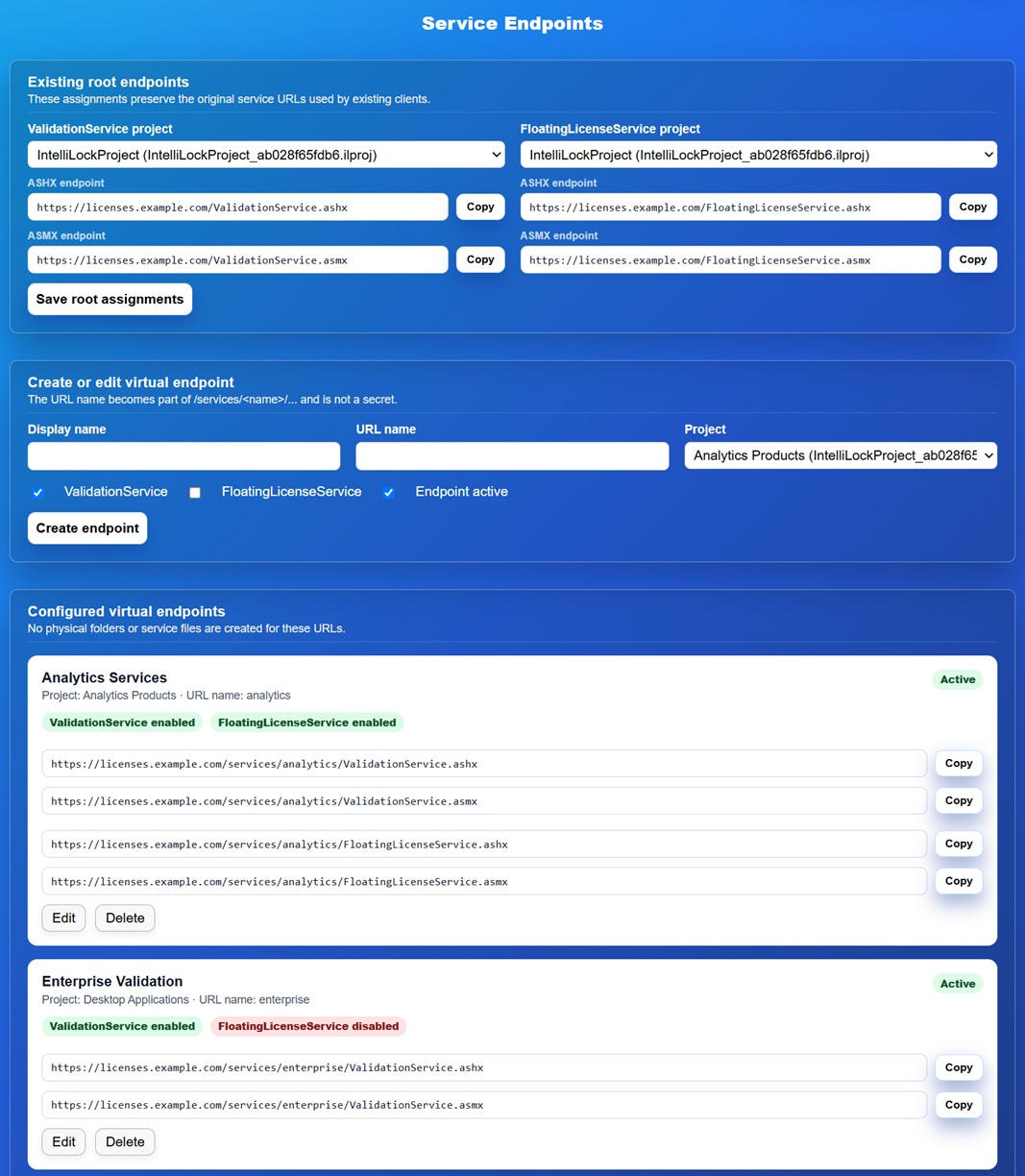
Service Endpoints connects public Validation/Floating URLs to IntelliLock projects. It supports the original root services and any number of named virtual profiles.
Most installations need only the root assignments. Use virtual endpoints when the same website serves several products that use different IntelliLock projects.
#
Root assignments
The existing root URLs preserve compatibility with already deployed clients:
/ValidationService.ashx
/ValidationService.asmx
/FloatingLicenseService.ashx
/FloatingLicenseService.asmx
Select the project for each root service and choose Save root assignments.
The project must reference an existing .ilproj inside App_Data.
#
Why both ASMX and ASHX are shown
The page always displays both forms for every Validation and Floating service. They have the same function and use the same endpoint and Project assignment:
- protected .NET Framework applications use
.asmx; - protected .NET 5 and later applications use
.ashx.
You may copy either displayed URL into the IntelliLock project. At runtime, IntelliLock automatically changes the suffix to the form required by the protected application. You do not need to maintain two license files or two endpoint profiles.
#
Virtual endpoints
Create a profile with:
- a display name for operators;
- a URL name such as
enterprise; - an IntelliLock Project;
- ValidationService, FloatingLicenseService, or both; and
- the Endpoint active state.
For URL name enterprise, the website exposes:
/services/enterprise/ValidationService.ashx
/services/enterprise/ValidationService.asmx
/services/enterprise/FloatingLicenseService.ashx
/services/enterprise/FloatingLicenseService.asmx
These paths are virtual. No directory, ASHX file or ASMX file is created under
services/enterprise. The central router resolves the URL, confirms that the
profile/service is active, and passes the request to the shared implementation.
ASMX WSDL documents advertise the virtual public URL.
You can copy and use these URLs immediately after saving the profile. Do not create matching folders on the server.
#
Disabling and deleting
- Disabling the whole profile makes all of its public URLs return HTTP 404.
- Disabling only Validation or Floating makes that service return HTTP 404 while the other service remains available.
- Deleting a profile removes its routing configuration, not physical files.
Use a new URL name instead of silently reassigning an endpoint that has already been shipped to customers.
#
Project validation
The page reports a prominent warning when a referenced project file is missing, unsafe or inaccessible. Fix the Project record/file before distributing the URL. System Health checks the same references and reports affected records.
#
Public-service rate limits
Default application limits are separated by service operation and effective client IP:
- 6,000 Validation requests per minute;
- 6,000 initial Floating registrations per minute; and
- 60,000 Floating pings/disconnects per minute.
Heartbeat limits are also separated by pool so a busy legitimate pool does not
consume another pool's allowance. HTTP 429 includes Retry-After.
These counters are local to one IIS process. Add an edge rate limit at the reverse
proxy or cloud gateway for production scale-out or public deployments. Configure
RateLimit.TrustedProxies only for known proxies; direct clients cannot choose
their identity through X-Forwarded-For.